NewMCMITO Live 1.4.1: run the test, then analyse it in MCMITO

Muscle mitochondrial capacity with NIRS, from the cuff to the rate constant.

Two Windows applications built on one analysis engine. MCMITO analyses repeated-occlusion recordings after you have collected them. MCMITO Live runs the test itself, then hands the recording straight to MCMITO.

Analysis after data collection

Import a recording from Artinis OxySoft, the Train.Red app or MCMITO Live. Place the occlusion markers, correct and calibrate the signal, and fit the recovery of muscle oxygen consumption to a rate constant.

  • Automated occlusion detection and guided marker placement
  • Blood flow correction after Ryan et al. (2012) or Beever et al. (2020)
  • Recovery-curve fit to k and τ, exercise and force dose, Excel and PDF reports
Version 1.4.2Free for research and educational use

Data capture, protocol and cuff control, with MCMITO built in

Stream muscle oxygenation and force over Bluetooth, guide the participant and the operator through your protocol, and inflate and release the cuff on time. When capture is complete, the recording opens in MCMITO in the same window.

  • Live NIRS from a Train.Red FYER sensor
  • Protocol builder with timers, cues, tones and a participant view
  • Automatic cuff control for the Hokanson E20
  • Force and exercise dose from a Tindeq Progressor 200
Version 1.4.1Licence key on request

MCMITO runs inside MCMITO Live.

MCMITO Live handles everything that happens while the participant is in the lab. When capture is complete it saves the session and opens it in its Analyse tab, which is MCMITO itself: the same engine, screens and exports as the standalone application. The protocol, markers, cuff times, force trace and exercise bouts travel with the recording, so the analysis starts where the test finished.

MCMITO Live

Sensors

  • Muscle oxygenation
    Train.Red FYER, Bluetooth
  • Force
    Tindeq Progressor 200, Bluetooth (optional)
  • Cuff
    Hokanson E20 via a controller box, or by hand

Protocol and capture

  • Timers, on-screen cues and tones
  • Cuff inflated and released on schedule
  • MVC trials and isometric targets
  • Markers placed as each phase starts
  • Autosave and a raw file of every packet

MCMITOin the Analyse tab, one click after capture

MarkersBlood flow correctionCalibrationOcclusion slopesk and τExercise and force doseExcel and PDF

Recordings from other systems

  • Artinis OxySoft exports (PortaMon, PortaLite, OxyMon)
  • Train.Red app session exports
  • MCMITO Live sessions, on any other computer

MCMITOstandalone, on any Windows PC

The same analysis, outside the lab

A session from MCMITO Live is an ordinary .mcmito file. Open it later in standalone MCMITO, share it with a colleague, or archive it with your data.

Which do I need?

If your recordings come from another system, MCMITO is all you need. If you want the software to run the test as well, choose MCMITO Live: it includes every analysis feature of MCMITO.

Features of MCMITO and MCMITO Live
Feature MCMITO MCMITO Live
Analysis
Opens Artinis OxySoft, Train.Red app and MCMITO Live recordingsYesYes
Automated occlusion detection and guided marker placementYesYes
Blood flow correction and physiological calibrationRyan et al. (2012) Methods 1–3 and Beever et al. (2020)YesYes
Per-occlusion slopes and recovery-curve fit to k and τYesYes
Exercise-period and force-dose analysisForce dose needs a recording made with a force gauge in MCMITO LiveYesYes
Excel workbook, PDF report and saved .mcmito sessionsYesYes
Running the test
Live muscle oxygenation over BluetoothTrain.Red FYERNoYes
Protocol builder with timers, on-screen cues and tonesNoYes
Automatic cuff inflation and releaseHokanson E20 with a controller boxNoYes
Protocol-timed manual cuff operationNo controller box neededNoYes
Live force, MVC trials and isometric targetsTindeq Progressor 200NoYes
Participant view on a second screenNoYes
Physiological calibration captured live; occlusions released at a set time or at a desaturation targetNoYes
Markers placed automatically from the protocolNoYes
Autosave, resume after an interruption, and a raw file of every packetNoYes
Getting started
Windows 10 or 11, 64-bitYesYes
HardwareNone: works on your filesBluetooth adapter and a NIRS sensor; E20, controller box and force gauge optional
Licence keyFree for research and educationOn request; one key covers the analysis inside

Using MCMITO in your research?

MCMITO is archived with a permanent DOI. Please cite the software, together with the underlying method it implements. If you recorded with MCMITO Live, cite MCMITO: it performs the analysis.

McManus, C. (2026). MCMITO: Near-infrared spectroscopy analysis of skeletal-muscle mitochondrial oxidative capacity (Version 1.3.0) [Computer software]. Zenodo. https://doi.org/10.5281/zenodo.22647702

Please also cite the method: Ryan TE, Erickson ML, Brizendine JT, Young HJ, McCully KK. Noninvasive evaluation of skeletal muscle mitochondrial capacity with near-infrared spectroscopy: correcting for blood volume changes. J Appl Physiol. 2012;113(2):175–183. doi:10.1152/japplphysiol.00319.2012

If you use blood flow correction Method 4 (the default for MCMITO Live recordings) or the best-fit slope window, please also cite: Beever AT, Tripp TR, Zhang J, MacInnis MJ. NIRS-derived skeletal muscle oxidative capacity is correlated with aerobic fitness and independent of sex. J Appl Physiol. 2020;129(3):558–568. doi:10.1152/japplphysiol.00017.2020

NewVersion 1.4.2 opens MCMITO Live session files and blanks sensor dropouts
MCMITO · Analysis after data collection

From a NIRS recording to a mitochondrial rate constant, in one workflow.

MCMITO turns repeated-cuff near-infrared spectroscopy recordings into reproducible measures of skeletal-muscle oxidative capacity.

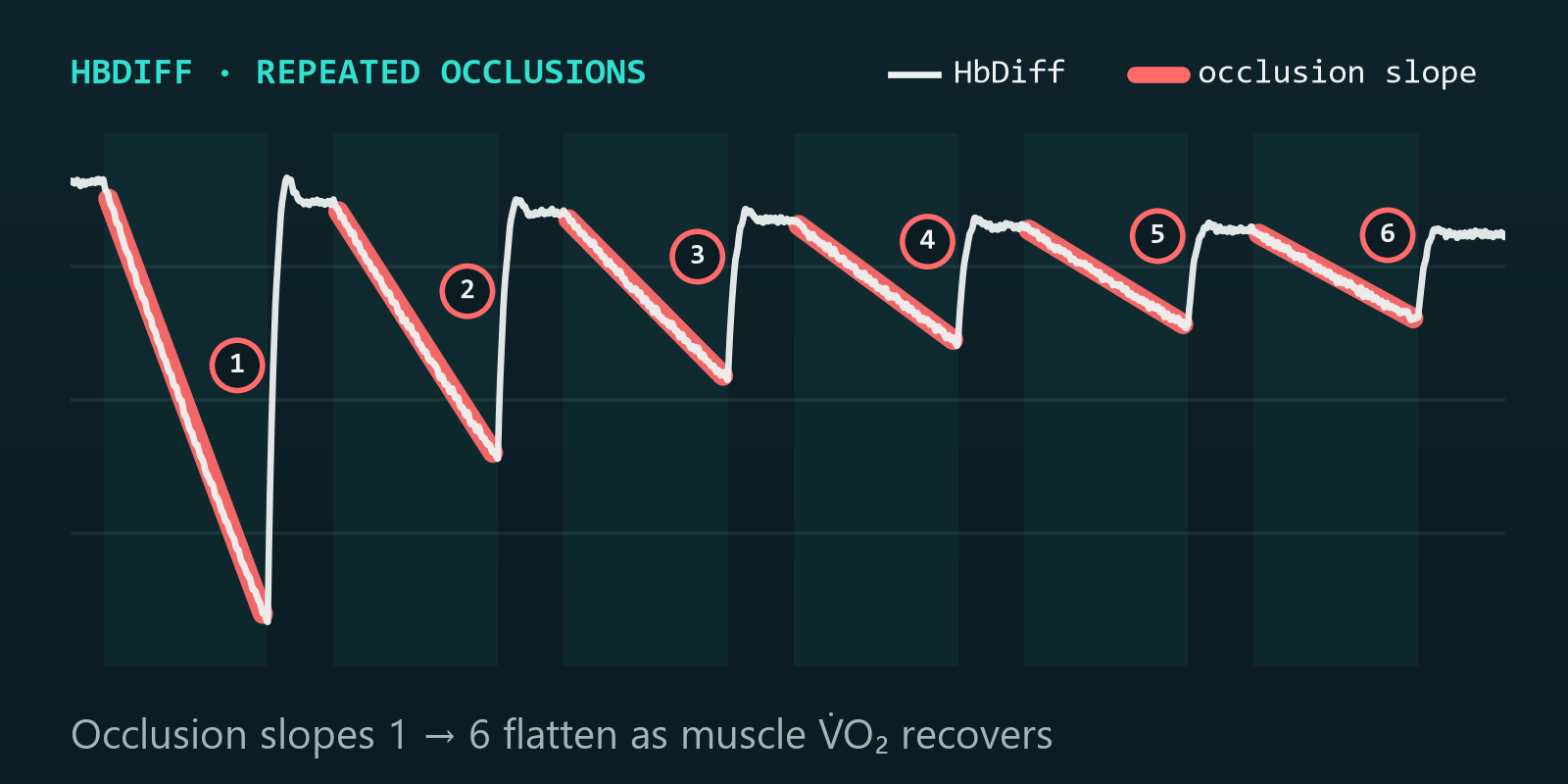
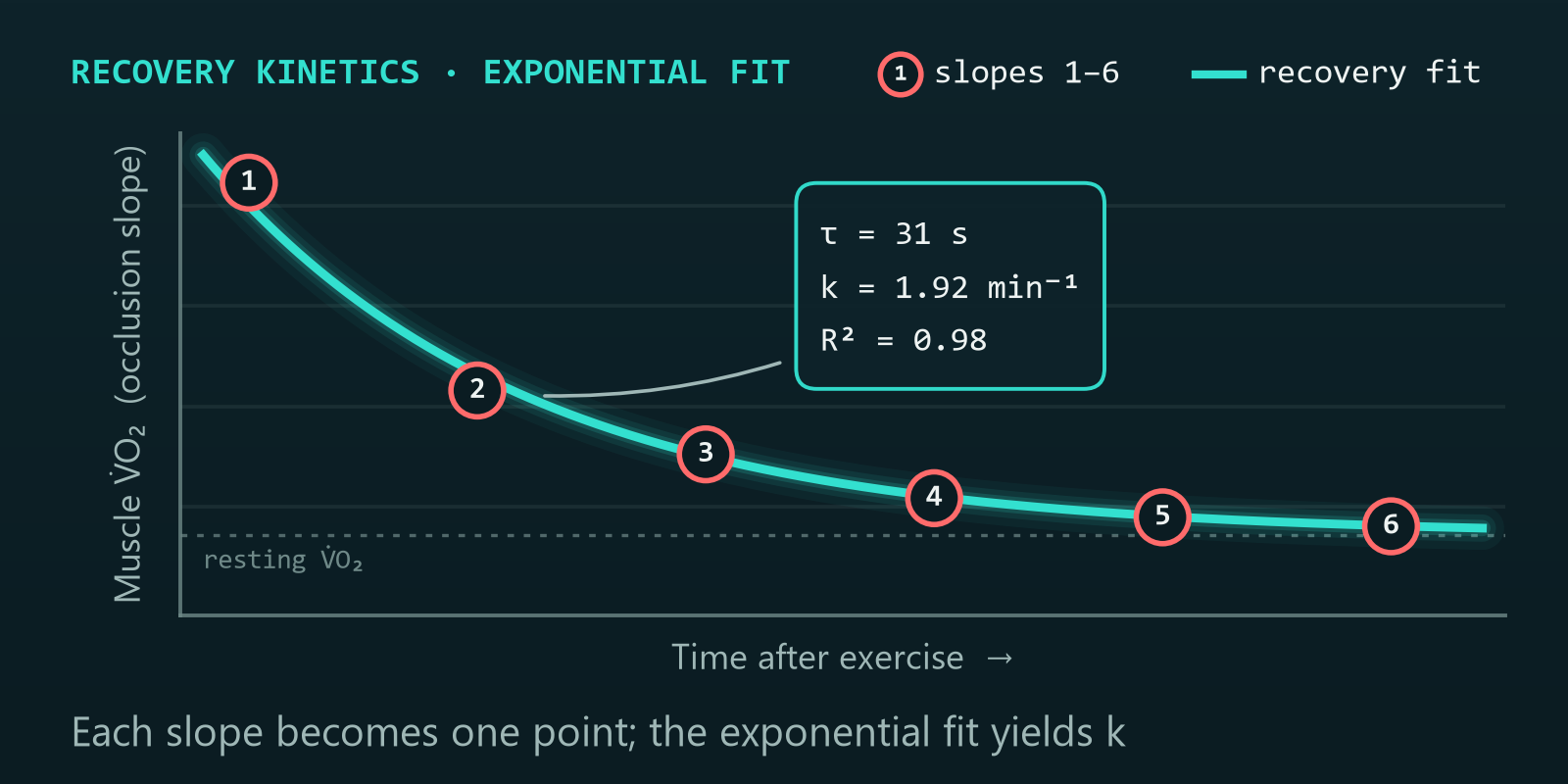
Raw HbDiff trace across six repeated arterial occlusions, the desaturation slope of each occlusion highlighted and numbered 1 to 6; the slopes flatten as muscle oxygen consumption recovers The six occlusion slopes plotted against time after exercise and fitted with a mono-exponential recovery curve, yielding the rate constant k
What's new · Version 1.4.2

Now updated to version 1.4.2.

Released 19 October 2026. Version 1.4.2 opens session files saved by MCMITO Live, treats the sensor's "no reading" zeros as gaps, makes the Protocol boxes drive the analysis and makes updating from inside MCMITO more reliable. Existing users can update from Settings → About → Check for updates.

MCMITO Live session files open

A .mcmito file saved by MCMITO Live now opens in MCMITO with its markers, protocol and force trace, so a recording can be emailed to a colleague who has MCMITO only. Version 1.4.1 could not read these files.

Sensor dropouts are gaps, not zeros

A Train.Red FYER sends 0 for a channel it has no reading for, as the sensor settles and when it lifts off. In MCMITO Live recordings these values now load as blanks, so the traces no longer drop to 0 and a 0 never enters a slope or a mean. Downsampling keeps a gap the same size.

Protocol boxes drive the analysis

Changing sets, occlusions per set, cycle period or occlusion duration after loading now updates auto-detect, the slope window, the fit overlay and the Excel export. The per-occlusion fit figure keeps its panel size for long protocols such as 2 × 17.

Cuff markers and smoother updates

After importing an MCMITO Live raw device file, the cuff markers can be loaded from the matching session file, so auto-detect is not needed. The in-app updater now closes MCMITO cleanly before it installs.

Version 1.4.1 (12 October) added exercise-period and force-dose analysis, MCMITO Live recordings, an optional resting occlusion and much faster plots. Analysis results are unchanged from 1.3.0 (algorithm version 2), except for an MCMITO Live recording with a sensor dropout inside an analysis window. Full release notes on GitHub ↗

Capabilities

The complete oxidative-capacity workflow, done properly.

Everything from raw haemoglobin traces to a defensible rate constant: automated where it should be, transparent where it matters.

Automated occlusion detection

Consensus detection finds every cuff occlusion across each set, with confidence scoring you can audit, accept, or adjust.

Recovery-curve fitting

Measure each occlusion slope over the full, steepest or best-fit window, then fit the mono-exponential recovery of muscle O₂ consumption to a rate constant (k) and time constant (τ), with standard errors and R² quality tiers.

Correction & calibration

Optional blood flow correction methods include Ryan et al. (2012) and Beever et al. (2020), with physiological 0–100% calibration, applied exactly as they are on your bench.

Transparent & reproducible

Every per-occlusion slope, exclusion, and fit is visible and exportable. Auditable results, not a black box.

Fast, interactive editing

Place markers from a guided checklist, then nudge, snap or drag them with instant feedback on full-resolution traces.

Three data sources

Artinis OxySoft exports, Train.Red app session exports and MCMITO Live recordings, with automatic format detection. Seconds-based files have their sample rate inferred and are regularised onto a uniform time grid, with the native timing recorded in every export.

Publication-ready exports

One click to a full Excel workbook and a formatted PDF report, saved to the folder you choose.

Exercise and force dose

Exercise periods as markers, the NIRS response of each period, and for recordings with a force gauge the time under load, impulse, % MVC and repetitions, with an exploratory dose–response fit.

Save & resume sessions

Archive a complete participant analysis as a single .mcmito file (data, markers, settings and fits) and reopen it exactly where you left off.

How it works

Five steps from recording to result.

A guided pipeline that mirrors the method as you run it in the lab.

01

Import

Drag in your NIRS recording: an Artinis OxySoft or Train.Red app export, or an MCMITO Live session. Map channels once; MCMITO remembers the layout.

02

Detect & mark

Auto-detect occlusions per set, or place and refine markers by hand from a guided checklist.

03

Correct & calibrate

Apply blood flow correction (Ryan 2012 or Beever 2020) and physiological calibration to the signal.

04

Fit

Extract per-occlusion slopes (full, steepest or best-fit window) and fit the recovery curve to k and τ.

05

Export

Save the Excel workbook and PDF report, and archive the full session.

Inside the platform

See it in action.

Real screenshots and screen recordings from the platform, from the imported trace to the fitted recovery curve and exercise-phase metrics.

Data Cleaning: auto-detect occlusions
One click of Auto-Detect finds every cuff occlusion in each set and places the markers for you, each with a confidence score, and you can review, adjust or remove any of them. Recorded live from the platform (version 1.2.0 interface).
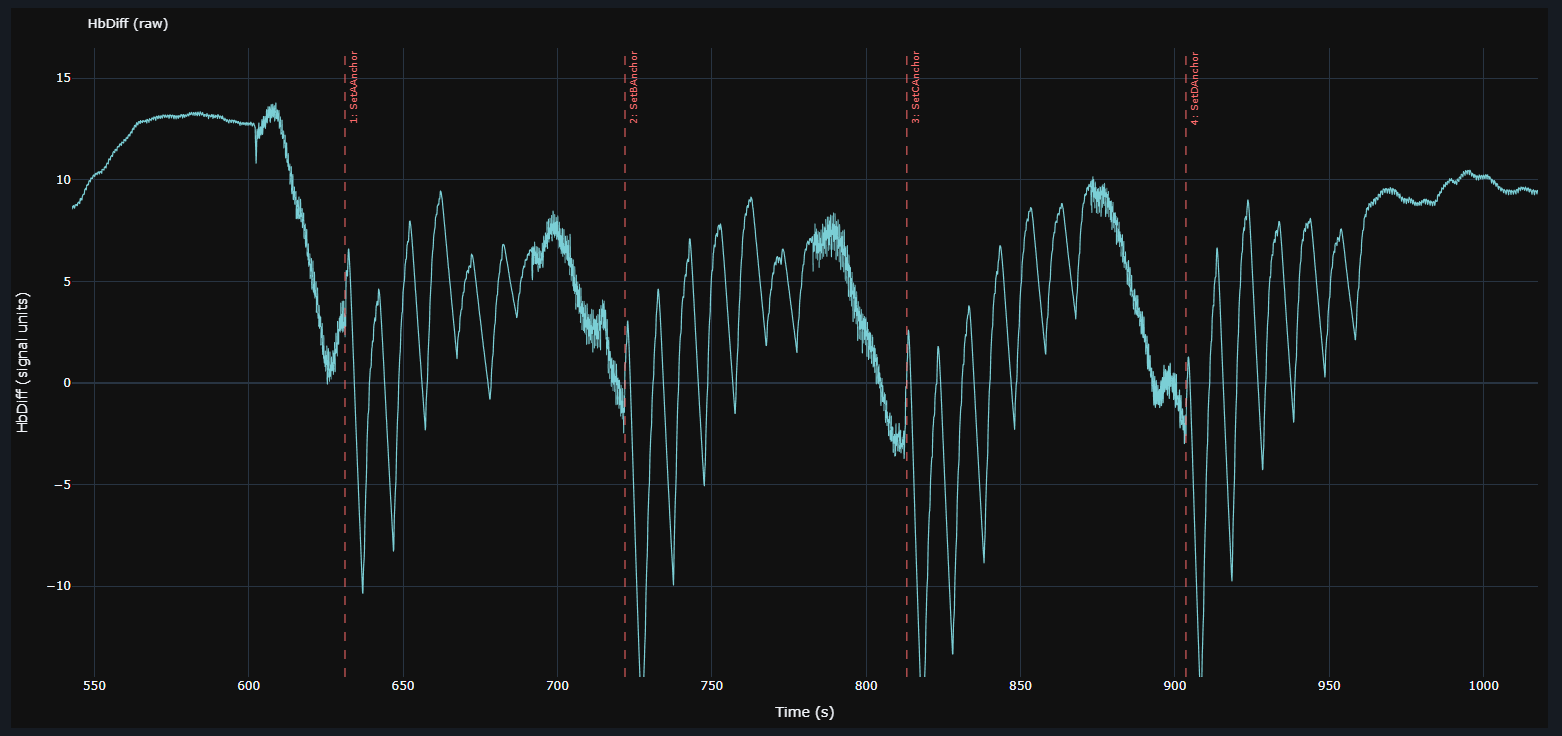
Data Cleaning: imported trace
MCMITO Data Cleaning view: a raw HbDiff recording at full resolution with dashed set-anchor markers for four occlusion sets
The recording as imported: full-resolution raw HbDiff, with set anchors marking the start of each of the four occlusion sets.
Mitochondrial Oxidative Capacity: curve fitting
Cycling through the curve-fitting views: per-occlusion mV̇O₂ points fitted with the mono-exponential recovery, per set and combined.
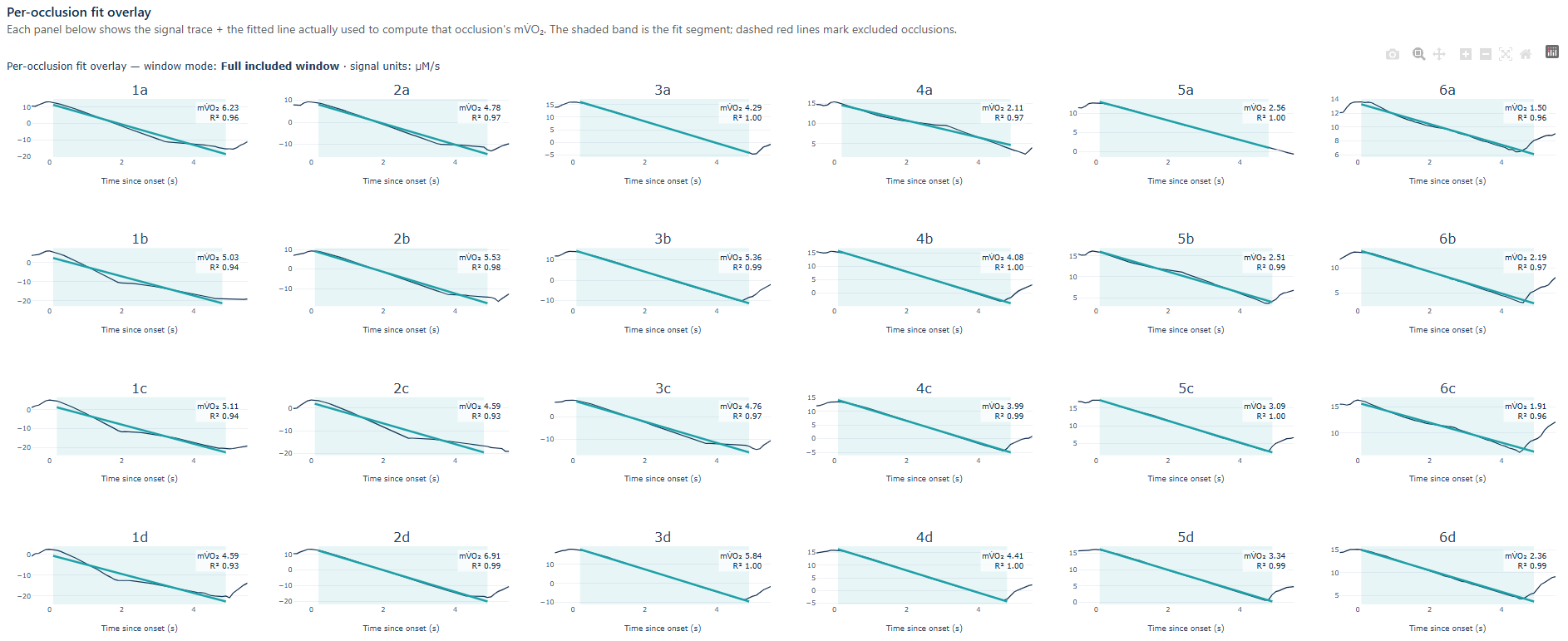
Per-occlusion fit overlay: mV̇O₂ and R²
Grid of every individual occlusion across four sets, each panel showing the signal, the fitted slope, its mV̇O₂ and R²
Every occlusion in every set, side by side, each showing the fitted line actually used, its mV̇O₂ and R². Exclusions are visible, not hidden.
Exercise Stimulus: phase analysis
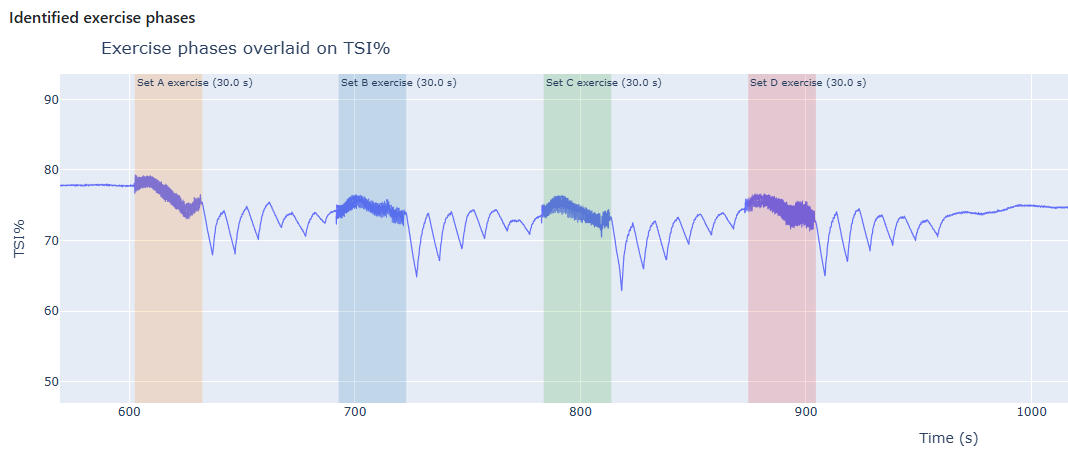
Exercise phases for four sets identified and shaded on the TSI% trace
Exercise-phase analysis: the exercise bout preceding each set is identified on TSI% and its key metrics extracted, the stimulus behind each recovery measurement. Shown in an earlier version; 1.4.1 adds exercise periods as markers and force dose.
Built on the method

Grounded in the published science.

MCMITO implements the established repeated-cuff NIRS method for muscle mitochondrial capacity, with optional blood flow correction following Ryan et al. (2012) or Beever et al. (2020), and has been validated against synthetic recordings with known kinetics, so you know the pipeline recovers the truth before it ever sees your data.

Ryan, Erickson, Brizendine, Young & McCully (2012)

Noninvasive evaluation of skeletal muscle mitochondrial capacity with near-infrared spectroscopy: correcting for blood volume changes. J Appl Physiol 113:175–183. doi:10.1152/japplphysiol.00319.2012

Beever, Tripp, Zhang & MacInnis (2020)

NIRS-derived skeletal muscle oxidative capacity is correlated with aerobic fitness and independent of sex. J Appl Physiol 129:558–568. doi:10.1152/japplphysiol.00017.2020

Bring the whole analysis in-house.

A protected, licensed desktop application for your lab, installed and running in minutes, with your data never leaving your machine. Please cite MCMITO when you publish.

Download MCMITO, free
New in version 1.4.1

Run the repeated-occlusion test from one screen.

MCMITO Live streams muscle oxygenation and force, times every phase of your protocol, inflates and releases the cuff, and places the markers as it goes. When capture is complete, the session opens in MCMITO for analysis.

Protocol builderMCMITO Live 1.4.1
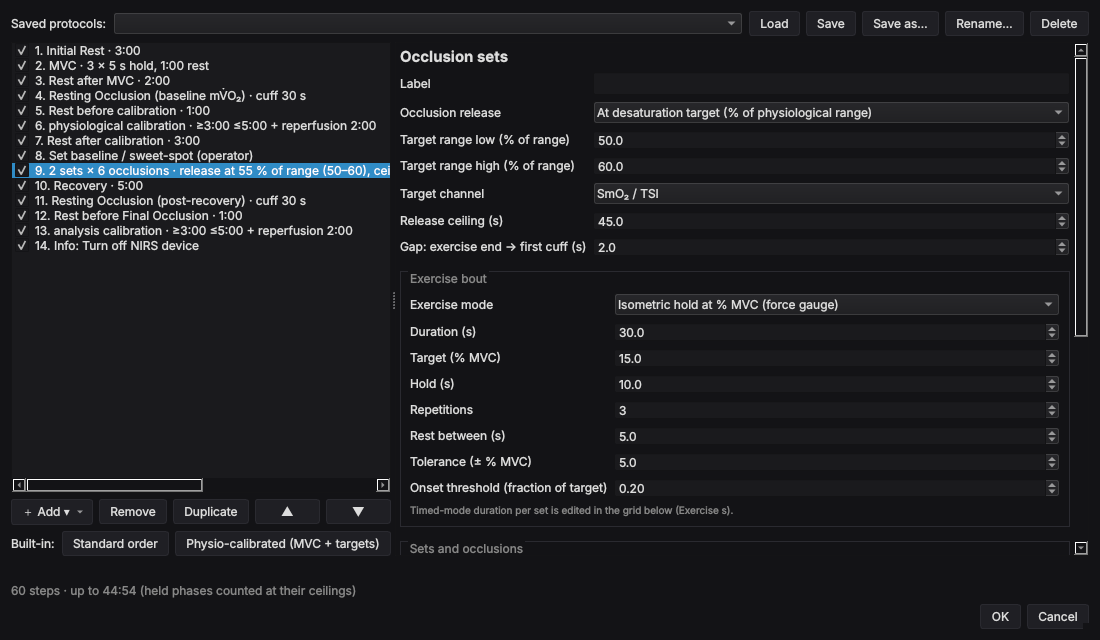
MCMITO Live protocol builder: a list of protocol blocks (rest, MVC, resting occlusion, physiological calibration, two sets of six occlusions released at 55 % of the physiological range) with the settings of the selected occlusion block
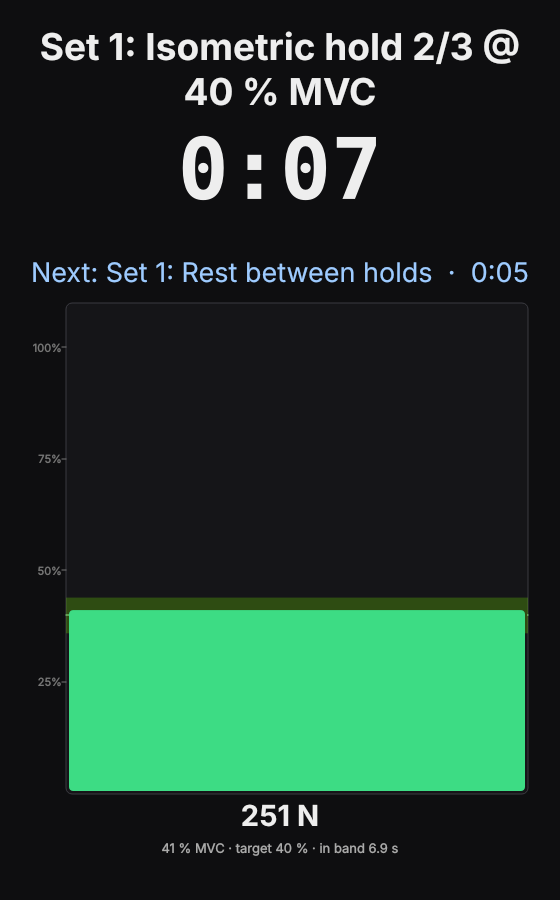
Participant view during an isometric hold: the current stage with 7 seconds left, the next stage and a force bar inside its target band

A session, step by step.

Everything the operator needs during the test is on one screen, and everything the analysis needs is recorded with the data.

01

Connect

Choose your NIRS sensor and force gauge from the devices in range, strongest signal first. No pairing in Windows settings.

02

Choose a protocol

Start from a built-in order or build your own from blocks, and save it for the next participant.

03

Run

Timers, on-screen cues and tones guide operator and participant, and the cuff inflates and releases on schedule.

04

Record

Markers for each phase are placed as it starts, and the session autosaves as you go.

05

Analyse

One click opens the recording in MCMITO, with the protocol, markers and force trace already in place.

The protocol builder with an occlusion-set block selected: occlusions released at a desaturation target between 50 and 60 % of the physiological range, with isometric holds at a percentage of MVC before each set
The built-in physiologically calibrated order, with an occlusion-set block selected.

Build the protocol your study needs

Protocols are made of blocks you add, reorder, duplicate and remove:

  • rests and resting occlusions;
  • an ischaemic calibration that ends on a NIRS plateau or at a ceiling;
  • MVC trials and isometric holds at a percentage of MVC;
  • exercise bouts with a metronome;
  • repeated occlusion sets, released at a set time or when SmO₂ falls to a target within its physiological range;
  • operator checkpoints and information steps.

Every block is optional, so the same builder runs a bespoke protocol with or without a cuff, a force gauge or exercise. Protocols can be saved and shared, and the exact protocol you ran is stored with the recording.

Participant view: the current stage, an isometric hold at 40 % MVC, with 7 seconds left; the next stage, a 5-second rest; and a force bar inside its target band
Participant view during an isometric hold.

A screen for the participant

Drag the participant view to a second display and press F11. It shows the current stage with its timer, the next stage with its duration, and, during isometric holds, a live force bar with the target band.

The operator's screen keeps the full picture: live SmO₂, O₂Hb, HHb and tHb with change from baseline, a blood-flow-corrected HbDiff trace, the protocol with what comes next, and the cuff state.

Automatic or manual cuff

With a controller box connected, MCMITO Live inflates and releases a Hokanson E20 at every cuff phase of the protocol, sounds a tone at each change and logs every event with its time.

Without one, the protocol runs exactly the same: the timers, cues and tones tell you when to inflate and release at the E20, and the markers are still recorded. A Cuff-Control-Only console runs a protocol and logs the cuff without a NIRS sensor, for familiarisation sessions or studies that record NIRS elsewhere.

About the controller box

When capture ends, MCMITO takes over.

MCMITO Live does not have a separate, simplified analysis. Its Analyse tab is MCMITO itself, running inside the same window.

What arrives with the recording

  • The protocol you ran, block by block
  • Markers for occlusions, calibration and rest
  • Exercise bouts, placed as exercise-period markers
  • The force trace, MVC and per-repetition force metrics
  • The cuff event log and the physiological calibration

What that means for your analysis

Click Analyse live session and MCMITO opens the recording with all of the above in place. Correct, fit and export as in standalone MCMITO.

MCMITO Live records absolute O₂Hb and HHb, so its recordings open with the Beever et al. (2020) blood flow correction. The Ryan et al. (2012) methods remain available.

The session is an ordinary .mcmito file, so you can also analyse it later in standalone MCMITO on another computer.

Compatible devices

MCMITO Live talks to each device directly. Sensors are found by the app's own scan, so nothing is paired in Windows settings.

DeviceWhat it providesConnectionStatus
Train.Red FYER Muscle oxygenation: SmO₂, O₂Hb and HHb Bluetooth Low Energy Supported
Tindeq Progressor 200 Force, for MVC trials, isometric targets and exercise dose Bluetooth Low Energy Supported
Hokanson E20 Rapid Cuff Inflator Cuff inflation and release Controller box from a USB port to the E20's rear foot-switch socket; or operated by hand Supported
Artinis PortaMon, PortaLite, OxyMon Muscle oxygenation Exported from OxySoft Analysis in MCMITO

What you need, and what you can do without

Full functionality needs a cuff inflator with a controller box and a force gauge. MCMITO Live still runs a complete, timed protocol without either.

For full functionality

  • A Windows 10 or 11 laptop with Bluetooth Low Energy
  • A Train.Red FYER NIRS sensor
  • A Hokanson E20 rapid cuff inflator and a controller box that connects the laptop to the E20's foot-switch socket
  • A Tindeq Progressor 200 for live force and exercise dose

Running with less

No controller box. The protocol runs with its timers, cues and tones, and you operate the E20 at each cue. Markers and timings are recorded as usual.

No force gauge. Leave out the MVC and isometric blocks, or enter a known MVC by hand. Timed exercise bouts with a metronome still work.

Your own protocol. Build any sequence of rests, exercise, occlusions and checkpoints, then step through it: pause, go back, skip ahead or end a held occlusion early.

The controller box

The E20 is normally switched by its foot pedal, which plugs into a ¼-inch socket on the back of the unit. MCMITO Live replaces the pedal with a small controller box: a USB lead to the laptop on one side, and a ¼-inch mono plug into the E20's foot-switch socket on the other.

How it works

When the protocol calls for the cuff, the box closes the same contact as the pedal. Cuff pressure is always set on the E20; the software only decides when to inflate and when to release.

The app arms the box before use, stops the cuff if the protocol is stopped, and records every inflation and release with its time.

Building one

We have built and tested two designs: a ready-made USB relay module in a small enclosure, at around £35 of parts, and an opto-isolated microcontroller box.

Build notes are available on request from cmcman@essex.ac.uk.

Independent of the manufacturers

MCMITO and MCMITO Live are independent research software. We have no affiliation with D. E. Hokanson, Tindeq, Train.Red or Artinis, and receive no funding or equipment from them. Product names are trademarks of their owners and are used here only to describe compatibility.

Know another device? We would like MCMITO Live to capture exercise dose from more equipment. If you use a validated, Bluetooth-capable device that measures force, torque or power during exercise, tell us about it at cmcman@essex.ac.uk.

Participant safety

MCMITO Live is a research aid, not a safety system. Software, computer, Bluetooth, USB or power faults can stop, delay or repeat a command.

A trained operator must be present throughout every occlusion and able to release the cuff at the E20. You are responsible for safe pressures and durations, for screening and supervising participants, and for working within your ethical approval and the manufacturers' instructions. Section 5A of the licence agreement sets this out in full.

Get MCMITO Live

Download the installer from GitHub and request a licence key with your Machine ID. One key covers MCMITO Live and the MCMITO analysis inside it.

Download MCMITO Live
Available now · MCMITO 1.4.2 · MCMITO Live 1.4.1

Download

Both applications install in a couple of minutes from their GitHub release pages. Each needs a licence key, issued by email for the computer you install it on.

MCMITO

Analysis after data collection. Free of charge for research and educational use. Opens Artinis OxySoft, Train.Red app and MCMITO Live recordings.

Installer: MCMITO_Setup_1.4.2.exe

MCMITO Live

Data capture, protocol and cuff control, with MCMITO built in. Licence key on request; one key covers the MCMITO analysis inside it.

Installer: McMitoLive_Setup_1.4.1.exe

01Download the installer

Open the latest release on GitHub and, under Assets, download MCMITO_Setup_<version>.exe or McMitoLive_Setup_<version>.exe. The manifest.txt file listed alongside it is used by the app’s own update check; you do not need it.

02Install

Run the installer, accept the licence agreement and follow the steps. Both applications install per user (no administrator rights needed), appear in the Start menu and can be installed side by side.

Requirements: Windows 10 or 11 (64-bit). Nothing else to install; everything is bundled. MCMITO Live also needs a Bluetooth Low Energy adapter for its sensors and, to drive the cuff, a USB port for the controller box. MCMITO opens in its own window using Windows WebView2, and falls back to your default browser if WebView2 is unavailable.

03Obtain your licence key

On first launch each application shows its Machine ID, a one-way hashed identifier derived from your computer’s hardware.

  1. Copy the Machine ID.
  2. Email it to cmcman@essex.ac.uk with your name and institution, saying which application it is for (the Request a key buttons above pre-fill the email).
  3. Paste the key you receive and click Activate.

Keys are product specific: an MCMITO key does not open MCMITO Live, and the reverse. Each key is tied to one computer and runs for a fixed period; the app warns you before it expires, and renewal is a new key for the same Machine ID, pasted into Settings → Licence in MCMITO or Help → Licence… in MCMITO Live. If you change computers, request a new key with the new Machine ID.

04Stay up to date

In MCMITO use Settings → About → Check for updates; in MCMITO Live use Help → Check for updates…. Updates are cryptographically signed, and your licence key, its expiry date, preferences, protocols and recordings are kept.

MCMITO and MCMITO Live are proprietary software provided under End-User Licence Agreements shown during installation. They are intended for research and educational use only and are not medical devices. If you use them in your research, please cite MCMITO.

← Back to home

← Back

Terms of Use

Website terms · last updated 12 October 2026

These terms govern your use of this website. Your use of the MCMITO and MCMITO Live software itself is governed separately by the End-User Licence Agreement presented when you install each application.

1. Use of this site

This website is provided for information about the MCMITO and MCMITO Live software. You may view and share its content for lawful, non-commercial, informational purposes. You must not misuse the site, attempt to disrupt it, or use it in any unlawful way.

2. No advice or warranty

The content on this site is provided in good faith and for general information only. It does not constitute professional, scientific, medical, or legal advice. To the maximum extent permitted by law, the site is provided “as is” without warranties of any kind, and we do not warrant that it will be accurate, complete, or uninterrupted.

3. Intellectual property

All content on this site, including text, graphics, logos, and the MCMITO and MCMITO Live names, is owned by or licensed to Chris McManus and is protected by intellectual-property laws. You may not reproduce or reuse it without permission, except as permitted by law. Third-party product names mentioned on this site are trademarks of their owners and are used only to describe compatibility; we have no affiliation with those owners.

4. The software

MCMITO and MCMITO Live are proprietary, licensed software. Access, installation, and use are subject to a separate licence and require a valid licence key. Nothing on this site grants you any right to use the software.

MCMITO is currently provided free of charge. It nevertheless remains licensed, not sold: your right to use it comes only from the End-User Licence Agreement, and we may change, suspend, or withdraw the free-of-charge offer at any time. Licences already issued continue for their stated term under that agreement. MCMITO Live licence keys are issued on request under its own End-User Licence Agreement.

5. Research use only — not a medical device

MCMITO and MCMITO Live are intended for research and educational use only. They are not medical devices and have not been assessed or approved by the Medicines and Healthcare products Regulatory Agency (MHRA) or any other regulatory authority. They must not be used for the diagnosis, prevention, monitoring, prediction, prognosis, treatment, or alleviation of any disease or condition, or for clinical decision-making. You are responsible for independently validating any results you rely on.

6. Equipment and participant safety

MCMITO Live can control third-party equipment, including a cuff inflator, during research with human participants. It is a research aid and not a safety system. You are responsible for the safe operation of all equipment, for the supervision and safety of participants, and for working within your ethical approval, as set out in the MCMITO Live End-User Licence Agreement.

7. External links

This site links to third-party sites we do not control, including manufacturers’ product pages. We are not responsible for their content or practices.

8. Liability

Nothing in these terms limits liability for death or personal injury caused by negligence, for fraud, or for any liability that cannot lawfully be excluded. Subject to that, to the maximum extent permitted by law we are not liable for any loss arising from your use of, or inability to use, this site.

9. Governing law

These terms are governed by the law of England and Wales, and the courts of England and Wales have exclusive jurisdiction.

10. Changes to these terms

We may update these terms from time to time. The current version is always the one published on this page, with the date of the last update shown above. Your continued use of the site after a change means you accept the updated terms.

11. Contact

Questions about these terms: cmcman@essex.ac.uk.

← Back

Privacy Policy

Last updated 12 October 2026

This policy explains how we handle personal data in connection with this website and the MCMITO and MCMITO Live software. It is written with the UK General Data Protection Regulation (UK GDPR) and the Data Protection Act 2018 in mind.

Who we are

The data controller for this website is Chris McManus (contact: cmcman@essex.ac.uk).

What we collect

This is a static informational website. We do not ask you to create an account or submit forms here. The site is hosted by Netlify, whose servers may automatically log standard technical information (such as IP address, browser type, and pages requested) for security and to operate the service; Netlify may process those logs outside the UK under its own privacy policy and standard data-protection safeguards. If you email us, we receive the information you choose to send.

To issue a licence key we also process the Machine ID shown on the MCMITO or MCMITO Live activation screen (a one-way hashed identifier derived from your computer’s hardware), together with the name, email address, and institution you give us.

How we use it

We use any information you send us solely to respond to your enquiry and to provide the software and licence keys you request. Our lawful bases under UK GDPR are our legitimate interests in operating this site and answering enquiries, and the performance of (or steps prior to) the licence agreement with you when we issue keys. We do not sell your data or use it for advertising.

The MCMITO and MCMITO Live software

Both applications run entirely on your own computer. They do not transmit your data, your participants’ data, or your results to us or to any third party. MCMITO Live connects directly to your sensors, force gauge and cuff controller over Bluetooth and USB; those connections stay between your computer and your equipment.

The one optional exception is software updates: if you use “Check for updates”, the application contacts GitHub (where releases are published) to fetch release information and, if you choose, download the installer. This sends no analysis data or personal data beyond the standard connection details (such as IP address) that any web request involves, which GitHub handles under its own privacy policy. You remain the controller of any personal data you process with MCMITO or MCMITO Live and are responsible for your own compliance with data-protection law.

Cookies & analytics

This site does not set cookies and does not use analytics or advertising trackers. If analytics are added in future, this policy will be updated to describe them and, where required, ask for your consent.

Your rights

Under UK data-protection law you have rights to access, correct, or erase the personal data we hold about you, and to object to or restrict its processing. To exercise them, contact us at the address above. You may also complain to the Information Commissioner’s Office (ICO) at ico.org.uk.

Retention

We keep enquiry correspondence and licensing records only for as long as needed for those purposes and to meet legal obligations: as a guide, licensing records for the term of your licence plus 12 months, and general enquiries for up to 12 months after our last contact.